Localise training videos into every language you teach in
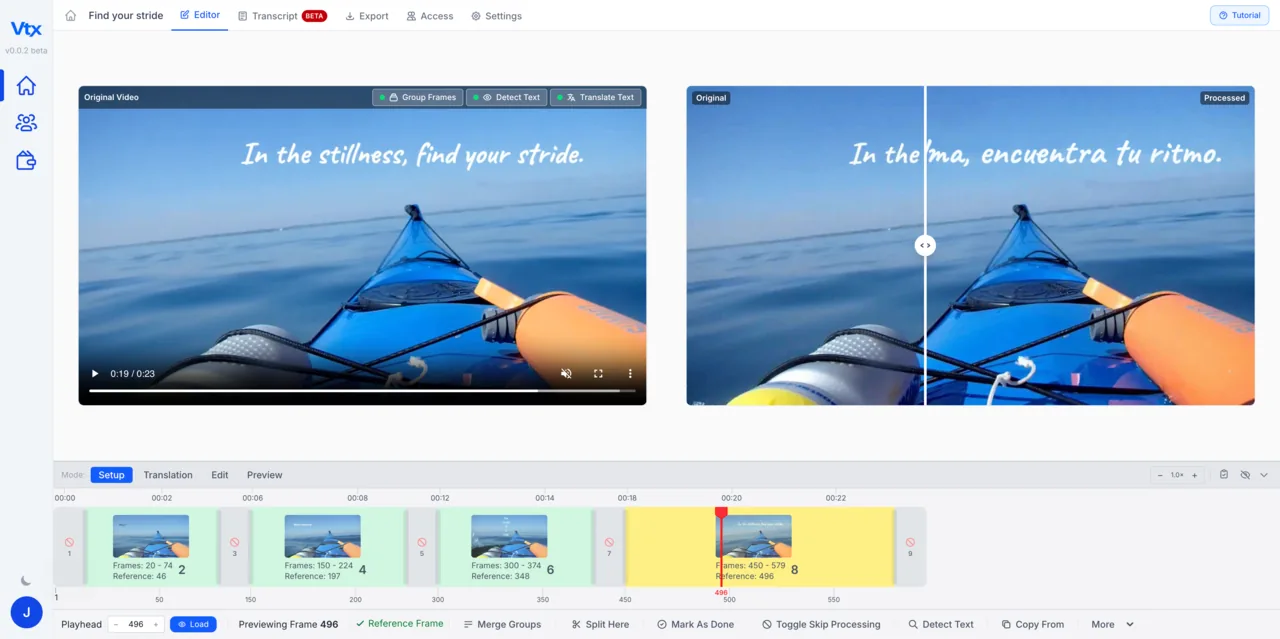
Training video is full of on-screen text: step titles, labels on the interface, callouts and summaries. Subtitles alone leave all of it in the original language. Vtx translates the text in the picture, so learners see the lesson in their own language.
Localising a training library the traditional way means re-editing every video for every language, with translators, editors and reviewers in the loop each time. Most organisations localise a handful of videos and leave the rest, or ship subtitles and accept that the graphics don’t match.
How it’s done
Extract the text once
Vtx lifts every on-screen element from the finished video. That extraction is done once per video, not once per language.
Translate in place
Replace each element with its translation, adjusting size and position where a language runs longer or uses a different script. Right-to-left and CJK scripts are supported.
Duplicate for the next language
Copy the edit, swap the text, export. A ten-language library becomes ten text passes over the same edit.
From upload to edited video in minutes.
Upload your video
Drop in any rendered video file — MP4, MOV or AVI. No source files, no editing project, no software install.
Vtx extracts every text element
The platform scans frame by frame to detect and lift every piece of embedded text — titles, lower thirds, captions, labels and graphics.
Edit and customise
Replace or rewrite any on-screen text directly. Adjust font, size, position, colour and timing so every edit matches the original design.
Export and reuse
Download the finished video. Every overlay is saved — change the text for the next version or language and export again in minutes.
Common questions
Which languages are supported?
Any language with a font: Latin, Cyrillic, Arabic, Devanagari, Chinese, Japanese, Korean and more, including right-to-left layout. See the language pages for examples.
Do I still need subtitles or a voice-over?
That depends on the content. Vtx handles the text in the picture; many teams pair it with a translated voice-over or subtitles for the spoken parts.
Who does the translation?
You or your translators. Vtx gives you the source text per element; you enter the translated text. Translators do not need editing skills or software.
“Vtx has been helpful to improve TEN Translations’ translated courses by enabling students to view on-screen graphics’ text in the translation language. This creates a more immersive experience for the viewer and enhances understanding of the content being taught. The tool can be used by anyone, even those with no prior video editing experience.”
Your first month of unlimited access
Fix your first video this month.
Save $461 94% off your first month
Then $490/month; cancel before your renewal and only pay $29. Extra seats $29 per seat per month. Includes an onboarding meeting and a private Discord channel with our engineers.