Change the text in a video after it’s been exported
The video is rendered, approved and published, and now a name, a date or a price has to change. Vtx edits the on-screen text directly in the exported file, so the change takes minutes instead of a re-edit and a re-render.
Normally a text change means finding the original project, the right version of it, the fonts it used and someone with the editing software installed, then re-rendering and re-uploading everything. For a two-word change, that is a day of someone’s time, if the project can be found at all.
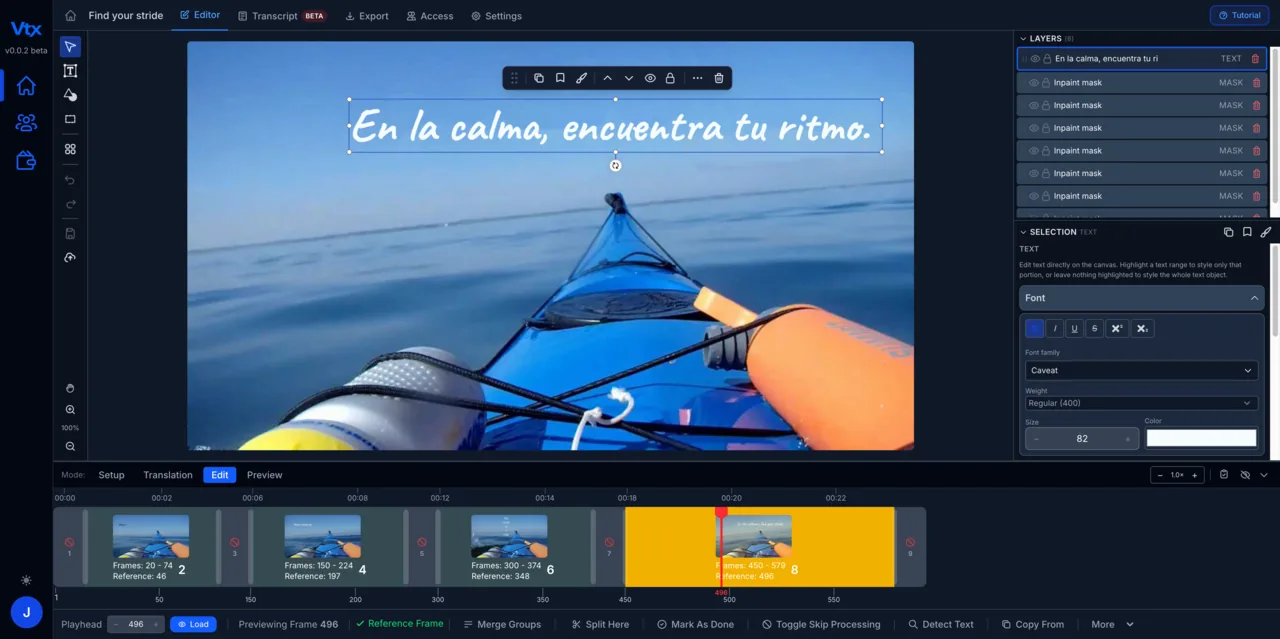
How it’s done
Upload the exported file
MP4, MOV or AVI. Vtx scans every frame and lifts each piece of embedded text — titles, captions, lower thirds, labels — as an editable element with its timing and position.
Change the words in place
Click the text, type the new version. Font, size, colour and position carry over, and you can nudge anything that needs it so the fix is invisible.
Export in the original format
Download the corrected video at the same resolution and format. The overlays stay saved with it, so the next change is just as quick.
A recorded demo, start to finish
Unscripted — recorded during a live customer demo and cut down to the walkthrough.
From upload to edited video in minutes.
Upload your video
Drop in any rendered video file — MP4, MOV or AVI. No source files, no editing project, no software install.
Vtx extracts every text element
The platform scans frame by frame to detect and lift every piece of embedded text — titles, lower thirds, captions, labels and graphics.
Edit and customise
Replace or rewrite any on-screen text directly. Adjust font, size, position, colour and timing so every edit matches the original design.
Export and reuse
Download the finished video. Every overlay is saved — change the text for the next version or language and export again in minutes.
Common questions
Does this work on any exported video?
Any standard video file works: MP4, MOV, AVI and more. Vtx does not need the project file, the fonts or the software the video was made with.
What happens to the video behind the text?
Vtx removes the original text from the frames and reconstructs the background behind it, then places the new text on top. Static and moving backgrounds are both handled.
Can I change animated or moving text?
Yes. Animated and moving text is supported: the element follows the same motion with the new words.
“My experience on the updated version of Vtx has been largely positive. There are now many more functions that have greatly improved the workability. I can focus on adding foreign text into the videos more easily.”
Your first month of unlimited access
Fix your first video this month.
Save $461 94% off your first month
Then $490/month; cancel before your renewal and only pay $29. Extra seats $29 per seat per month. Includes an onboarding meeting and a private Discord channel with our engineers.